I recently read through the official Docker Docker Reference documentation again and found that There are still a lot of details to dig into. For writing Dockerfile, most of the time there is no big problem as long as you follow it. But it would be more interesting to understand more deeply.
To talk about how to gracefully close the container, we have to mention the idea of Signal, and the ENTRYPOINT and CMD directives in Dockerfile. Before we get into the specifics of graceful shutdown, let’s understand the basic concept of signaling in Linux.
1 Signals
Signals are a notification mechanism for processes when an event occurs, sometimes called a software interrupt.
There are different types of signals. Linux numbers the standard signals from 1 to 31, and you can get the signal names with kill -l.
There are more than 31 signals actually listed, some synonymous with other names, and some defined but not used. A few of the commonly used signals are described below.
1) SIGHUPThis signal is sent to the terminal control process when the terminal is disconnected (hung). TheSIGHUPsignal can also be used for daemons (e.g., init, etc.). Many daemons will re-initialize and reread the configuration file when they receive theSIGHUPsignal.2) SIGINTThe terminal driver sends this signal to the foreground process group when the user types a terminal break character (usually Control-C). The default behavior of this signal is to terminate the process.3) SIGQUITThis signal is sent to the foreground process group when the user types the exit character (usually Control-\) on the keyboard. By default, this signal terminates the process and generates a core dump file for debugging purposes. TheSIGQUITsignal is appropriate if the process is stuck in an infinite loop, or if it no longer responds.9) SIGKILLThis signal is asure killsignal, which cannot be blocked, ignored, or captured by the processor program, so it is aone-hit killand always terminates the program.15) SIGTERMThis is the standard signal used to terminate a process and is the default signal sent by thekill,killall, andpkillcommands. A well-designed application should set up a handler for theSIGTERMsignal so that it can preemptively clear temporary files and release other resources to get out of the way. Therefore, you should always try to use theSIGTERMsignal to terminate processes first, and useSIGKILLas a last resort to deal with runaway processes that do not respond to theSIGTERMsignal.20) SIGTSTPThis is the job control stop signal, which is given to the foreground process group to stop running when the user types the hang character (usually Control-Z) on the keyboard.
It is worth noting that Control-D does not initiate a signal that indicates EOF (End-Of-File), which closes the standard input (stdin) pipeline (e.g. you can exit the current shell with Control-D). If the program does not read the current input, it is not affected by Control-D.
The program can capture against the signal and then execute the corresponding function.
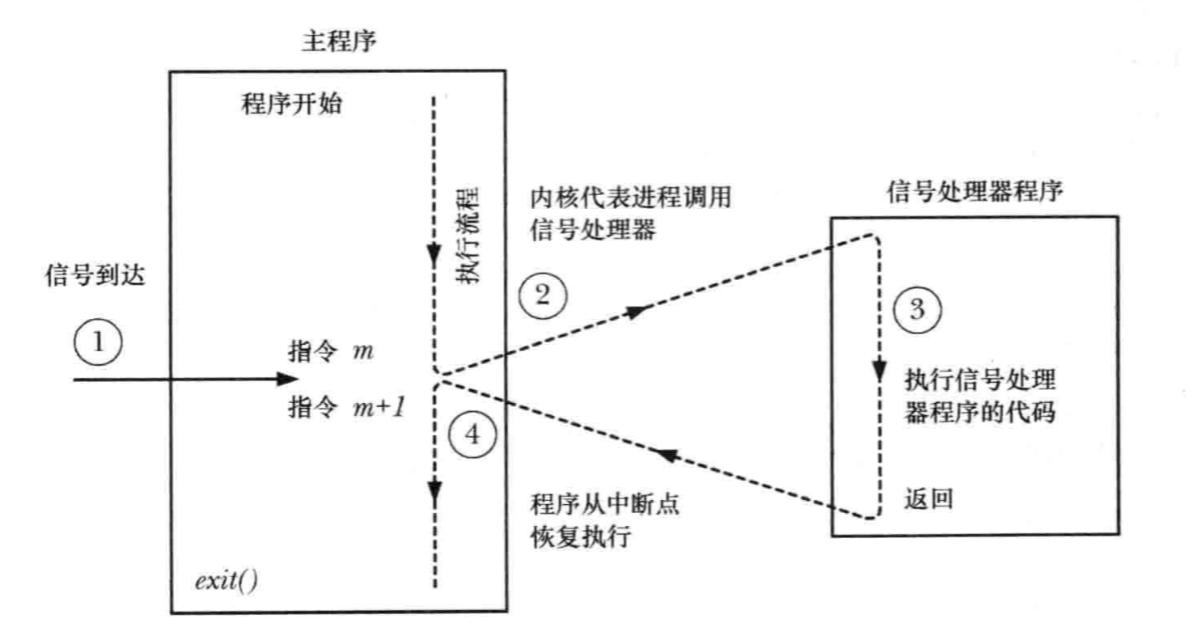
2 ENTRYPOINT, CMD
signals are closely related to how to gracefully shut down a container. Moving on to the ENTRYPOINT and CMD directives in Dockerfile, their main function is to specify the program that will be executed when the container starts.
There are three formats of CMD.
CMD ["executable", "param1", "param2"](in exec format, which is recommended)CMD ["param1", "param2"](asENTRYPOINTcommand parameter)CMD command param1 param2(shell format, default/bin/sh -c)
ENTRYPOINT has two formats.
ENTRYPOINT ["executable", "param1", "param2"](exec format, this format is recommended in preference)ENTRYPOINT command param1 param2(shell format)
In particular, regardless of which command you use for Dockerfile, it is recommended to use the exec format for both commands instead of the shell format. The reason for this is that with the shell format, the program will start with the /bin/sh -c subcommand, and no signals are passed to the program in the shell format. This means that programs running in this format do not catch the signals sent when the docker stop container is running, and cannot be shut down gracefully.
docker stop sends a SIGTERM signal by default when stopping a container, and SIGKILL forces the container to stop if it is not stopped after 10s by default. The -t option allows you to set the wait time.
The -s option of docker kill also allows you to specify the signal to be sent to the container.
So, after all that, all you have to do is execute the container start command in Dockerfile with the exec format and everything will be fine? Of course it’s not that simple, let’s see how it works by example.
3 Example
Write a simple signal handler via Go.
|
|
3.1 Example 1
Open two panels with tmux, one to run the container and one to execute docker stop.
You can find that the program receives the signal and outputs the corresponding message before the container stops, and the total time taken to stop is 0.732 s, which achieves a graceful effect.
Modify the CMD execution format in Dockerfile to perform the same operation.
After going through the shell format, we can see that the program did not receive any signal before the container stopped, and the stop time is 10.719s, indicating that the container was forced to stop.
The conclusion is clear that in order to exit the container gracefully, we should use the exec format.
3.2 Example 2
With example 1, we all know that the program is executed in Dockerfile by exec, but what if the executed program is also a shell script?
The test still references the method in Example 1.
You can see that even though the CMD command in Dockerfile is in exec format, the program in the container still does not receive the signal and is forced to close. The signal is still not delivered because of the execution in the shell script, so we need to do some modification for the shell script.
As you can see, after adding the exec command, the program can receive the signal to exit normally again. Of course, if the CMD in your Dockerfile is running in shell format, even adding exec to the startup script will not work. Furthermore, if your program itself can’t do something about the signal, you can’t talk about a graceful shutdown.