Fish (Friendly Interactive shell)
This is a groundbreaking shell that creates a new shell user interaction experience. Syntax highlighting, auto-completion based on manpage, auto-suggestions are all its firsts!
2B youth with bash, ordinary youth with zsh, literary youth with fish.
The default configuration of fish is really good, the configuration file is: ~/.config/fish/config.fish
fish uses functions to set behavior: fish fully uses functions to customize behavior, you can customize fish’s behavior by adding some special functions, for example prompt, fish doesn’t have special variables like PS1, but uses functions.
Syntax highlighting, auto-suggestion
Path folding ~/D/E/detail to avoid long paths
Easy to understand syntax, this is not POSIX shell compatible, it has its own syntax
Here doc is not supported (of course neither is here string).
The official explanation is because you can substitute other commands, e.g.
printf but the way it is written can also be used in bash, but there are differences in the details from fish.
- fish uses
$statusto get the exit status of the previous command instead of$?. - The array count in fish starts at
1, not0as in most programs. - fish does not use the
&&and||syntax to combine commands, but rather theandandorcommands: but fish 3.x already supports&&,||. - fish uses
echo (echo 233)instead of “echoecho 233”.
The odd command fish_config, this opens an http server and configures it on the web page. As a shell, I’ve always found it strange to open a browser to set up a shell.
Setting variables
Many people think that fish is too weird to set variables. In fact, it’s the POSIX shell that’s stranger
Recall that the scope of Shell variables can be divided into three types.
- Some variables can only be used inside a function, this is called a local variable
- Some variables can be used within the current shell process, which is called a global variable
- And there are variables that can be used in child processes, which are called environment variables.
We usually know the variables of normal programming languages.
g / --globalglobal variable (default), valid in the current runtime environmentl / --locallocal variables, valid only in the current scope
Environment variables (environment variables are actually ordinary variables whether or not they have the export attribute).
x / --export(default) This variable can be passed to child processesu / --unexport(default) This variable cannot be passed to child processes
The operators of declare are +, -: - means enable this property, + means cancel this property. Yes, I wrote it correctly, he is the opposite.
export is essentially the declare -x command.
According to the GNU bash documentation: the typeset command is provided for compatibility with the Korn shell. It is the same as the declare command.
The POSIX shell stores strings, integers and arrays are just a special property (the variable property of fish cannot be added or removed). These are the more commonly used ones (see the official manual for the complete list, also large (u upcase) and small (l lowcase) write conversions, etc.)
aindexed array variableAassociative array variableffunction nameiThe variable will be treated as an integerrread-only, can’t change can’tunsettdebug to keep track of this variable. (presumably bash-specific)xexport variables into environment variables
Persistent and clear variables.
U / --universalUniversal variables, all valid under the current user, and persistent (will save)e / --eraseclear a variable
U is equivalent to writing in the configuration file, e is equivalent to the unset command
For example: set -Ux EDITOR vim will make the environment variables global and persistent, even if the shell restarts. It is recommended to use set -Ux to save common environment variables, which are automatically saved to ~/.config/fish/fish_variables.
For operations on arrays.
a / --appendAppend values to the current array of variables. Can be used with--prependto add and append at the same time. This cannot be used when assigning to a mutable slice.p / --prependThe values are pre-set to the current set of values for that variable. It can be used together with--appendto insert to the top of the array. This function cannot be used when assigning to variable slices
~ and $HOME are not equivalent, PATH="$PATH:~/go/bin" just doesn’t work. "" only explains the variables, not the ~ expansion. Also ~ must appear at the top of the expression, otherwise it is a normal character. After : it will be treated as a separate expression, so it is normal too. It is recommended to use $HOME whenever possible
NODE_ENV=production node index.js is not available inside fish, so you can switch to a more generic way of writing it, using the env command.
|
|
Configuration framework and plugin management
- Oh-my-fish
A configuration framework similar to oh-my-zsh, which incidentally comes with a package manager
Of course, fish already works very well by default. It doesn’t need much configuration, but you can still find some better uses from oh-my-fish configuration (like Elvish-like navigation mode).
- Fisher This was originally called fisherman
This is an extremely streamlined fish plugin manager.
Elvish
tuna used to be the president of the shell developed by Xiao Ti
So far Elvish has not released version 1.0
Elvish’s improvements for interaction
Ctrl-Ris optimized for search historyCtrl-LShow directory stack. Equivalent to list selectiondirs -vfor jumpingCtrl-NNavigation mode This is my favorite feature, similar to ranger or nnn file management, this feature is great!
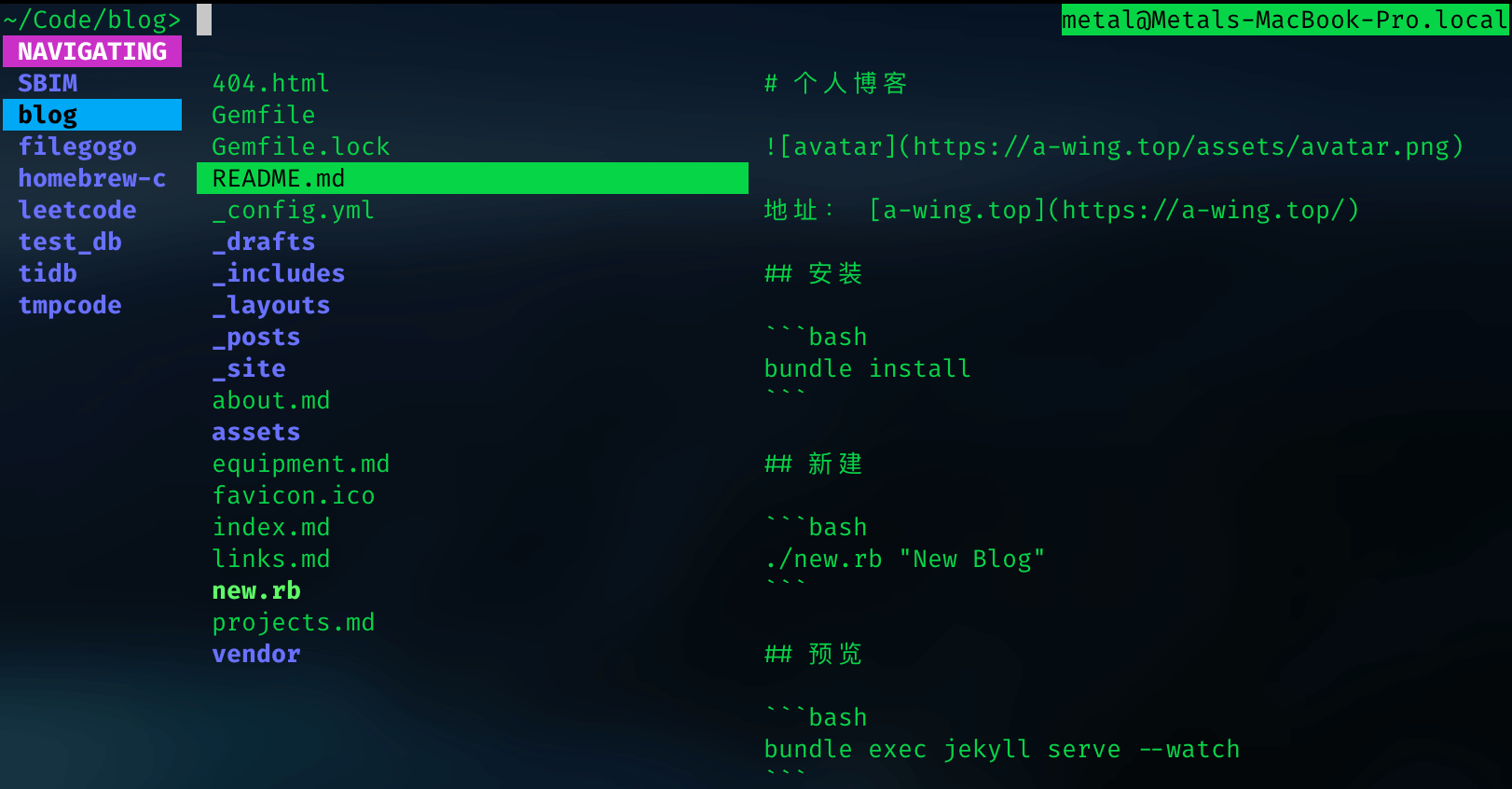
Elvish also integrates its own package management.
What should the pipeline transmit?
Unix’s pipeline transfers one character after another, with no other structure. A character can convey very little information; to overcome this difficulty, most Unix tools treat a line as a piece of data. For example, sed can perform operations such as substitution for each line, and grep finds all lines containing a given character. This “structure” is not inherent to the pipeline, but rather to the tool’s conventions.
This makes it problematic when the data itself contains newline characters. For example, this code to delete the .bak file in the current directory and its arbitrary level subdirectories (if you don’t understand this code, see here).
|
|
If there is a file named a\n.bak in the current directory, then rm will try to delete the file a and the file .bak instead of a\n.bak. This is because xargs cannot distinguish between newlines that separate data and newlines that are internal to the data.
It is common practice to have find separate the output items with \0 and to have xargs also separate the reads with \0.
|
|
We’re lucky in the case of filenames, because Unix filenames don’t allow \0. What if the data we want to process also happens to contain \0?
This kind of plain text processing will always be ambiguous, so to solve this situation, we have to transfer a “type” field
I don’t know how to describe it, but I’ll borrow from elvish author’s description: it’s divided into poor pipe and rich pipe
- A poor pipe is a traditional raw transfer (the POSIX shell transfer method)
- A rich pipe is a typed handle (a piece of data plus a type, that’s two fields, or a transfer object)
The rich pipe is used for the transfer of all built-in commands, and is compatible with the external command interaction with the poor pipe.
The rich pipe transfers objects, the more famous PowerShell also transfers dotnet objects inside this pipe
Ion Shell
This is the default shell for Redox OS, created by a bunch of crazy people.
The focus is on syntax and execution efficiency, and it’s pretty much the same as the default bash / zsh, which is not POSIX shell compatible.
Ion uses a new syntax for data redirection ^, which I think is probably not a good improvement. Maybe with Redox OS this might be good
There are three standard IO’s.
stdinstandard input/dev/stdinstdoutstandard output/dev/stdoutstderrstandard error/dev/stderr
The output messages are stdout and stderr and can be redirected separately
| Name | POSIX shell | Fish | Elvish | Ion | PowerShell | Nushell |
|---|---|---|---|---|---|---|
| From file to standard input | < | < | < | < | < | < |
| Writing output to a file | > , 1> | > , 1> | > , 1> | > | > , 1> | > , 1> |
| Output append write to a file | » , 1» | » , 1» | » , 1» | » | » , 1» | » , 1» |
| Writing errors to a file | 2> | ^ , 2> | 2> | ^> | 2> | 2> |
| Writing error append to a file | 2» | ^^ , 2» | 2» | ^» | 2» | 2» |
| Write all to one file | &> | &> | Not supported | &> | Not supported | &> |
| Output and error writing to a file | > file 2>&1 | > file 2>&1 | > file 2>&1 | Not supported | Yes, but the semantics are different | > file 2>&1 |
Writing all to a file and output and error writing to a file (command >file 2>&1 or append write command >>file 2>&1) are exactly equivalent
Fish also supports >? , ^? does not write output if the file exists, ion also supports multiple redirects command > stdout ^> stderr &> combined
File Descriptor FD (File Descriptor)
The ^ description stderr syntax of fish and ion looks much better. But why does the POSIX shell use 1 and 2 to distinguish between stdout and stderr?
On Unix systems, everything is a file, and each process opens three files as input, output, and error by default, with the first three file descriptors being (in a constant order)
0:stdin1:stdout2:stderr
Here, it is easy to understand that the standard input and output of a Unix system is essentially the reading and writing of three files, 1> , 2> referring to the file descriptors. So it may not make sense to use ^ to describe errors (this is a convention, not a rule)
Opening a file will assign a unique FD from 3 onwards, or you can specify it manually. (You can see the correspondence between FD and file in /proc/self/fd)
Note here: sh -c "echo 000 >&0; echo -n <&0" Passing data inside the script, stdin is always in interactive input (using cat will block because it cannot read the end of the file)
The pipeline will write stdin data followed by the terminator EOF, which is written as follows
echo 000 | sh -c "cat <&0"sh -c "cat <&0" <<< 000echo 000 | sh -c "cat /dev/stdin"Of course,/dev/stdinand<&0are the same
Be aware when using ls to view fd that because of the way ls works, a temporary fd is created
PowerShell (pwsh)
PowerShell is a task automation and configuration management framework from Microsoft that consists of a command line shell and an associated scripting language.
Originally, it was just a Windows component known as Windows PowerShell, and on August 18, 2016, with the introduction of PowerShell Core, it is now split into two versions: Windows PowerShell and the cross-platform PowerShell Core
PowerShell doesn’t seem to work well outside of Windows. Maybe it’s because I don’t know how to use it
PowerShell’s pipeline passes .net object instead of raw strings
which has a modern syntax, similar to the operations of a scripting language like python or ruby. Everything is treated as a dotnet object (somewhat similar to ipython, pry). It is possible to understand common data structures
NuShell
Much like the PowerShell idea, it can also be understood as a data structure, or as a “PowerShell” for Linux.
Look at the default ls, that’s what a modern shell should look like. Of course, this ls is a built-in command, and Nushell has a lot of common commands built in, which gives you a brighter look and feel.
|
|
nushell has an extremely rich data structure, just like a modern programming language
Common data formats are supported: * json
- json
- yaml
- toml
- xml
- csv
- ini
With a more logical syntax.
|
|
Even integrated curl-like commands (using nushell to understand and parse xml)
Using REPL (Read-Eval-Print Loop) as a shell
The interactive environment of modern programming languages, such as IPython, Pry, seems to work as a login shell. It’s not a shell in the traditional sense, but it’s often suggested as a login shell, but it’s too slow to start.
Also, as a shell, most of the time it is used to execute external commands, and it is very tiring to type an extra character every time.
Perhaps we could fuse a common shell with REPL. e.g. xonsh fuses python and shell, either written in shell or using python directly.
Similarly, there are fusions of other languages, such as fresh-shell which fuses Node.js.